 XIA LEI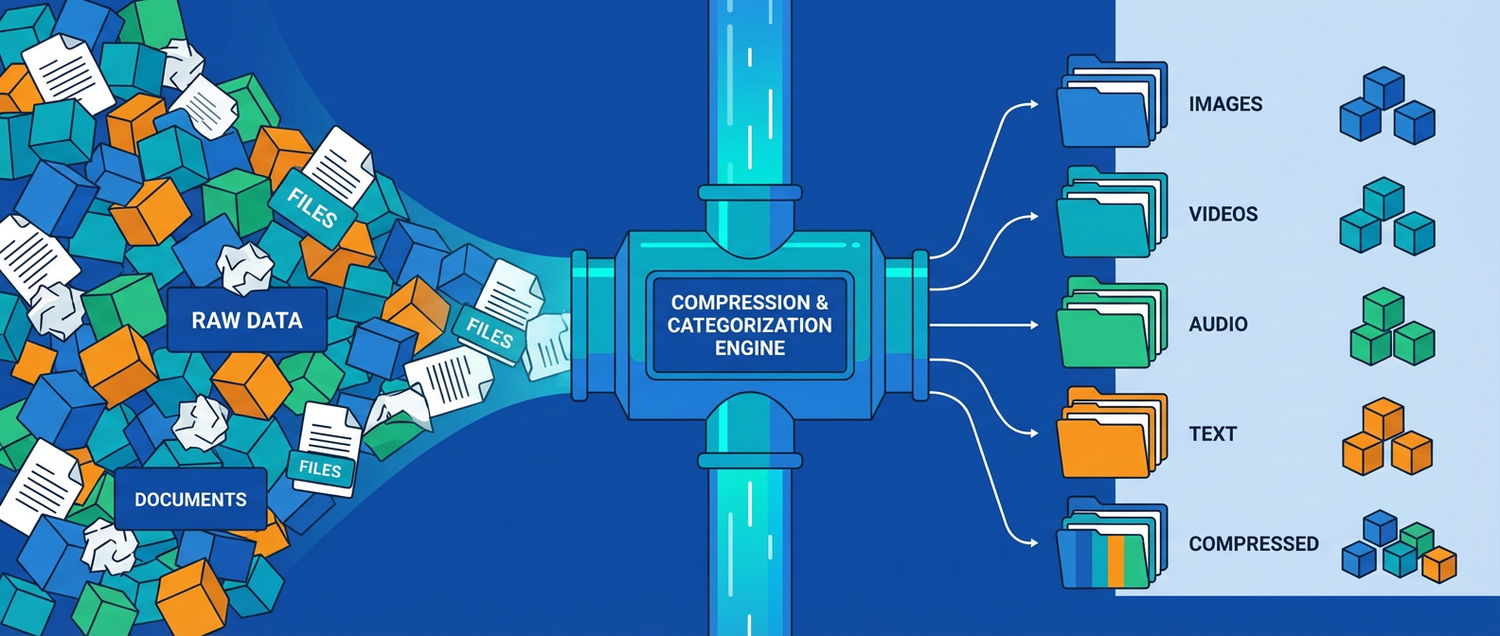
How to Minimise AI Data Size and Auto-Categorise It Properly
Working with AI means working with enormous datasets — training corpora, model checkpoints, embedding vectors, and inference logs. Storage costs climb fast, and finding the right data for fine-tuning or evaluation becomes a needle-in-a-haystack problem. This guide covers proven techniques for shrinking AI data and auto-organising it so your ML pipeline stays lean and searchable.
Part 1: Minimising AI Data Size
1. Quantise Model Weights
Full-precision models are huge. Quantisation compresses weights from 32-bit floats down to 8-bit or even 4-bit integers with minimal quality loss:
| Precision | Size (7B model) | Quality Loss | Use Case | |
|---|---|---|---|---|
| FP32 | ~28 GB | None | Research baselines | |
| FP16 | ~14 GB | Negligible | GPU training / inference | |
| INT8 | ~7 GB | Minimal | Production serving | |
| Q4 (4-bit) | ~4 GB | Very small | Edge / laptop deployment | |
| Q2 (2-bit) | ~2 GB | Noticeable | Ultra-constrained devices |
# Quantise a Hugging Face model to 4-bit with bitsandbytes
from transformers import AutoModelForCausalLM, BitsAndBytesConfig

bnb_config = BitsAndBytesConfig(
    load_in_4bit=True,
    bnb_4bit_quant_type="nf4",
    bnb_4bit_compute_dtype="float16",
)

model = AutoModelForCausalLM.from_pretrained(
    "meta-llama/Llama-3-8B",
    quantization_config=bnb_config,
    device_map="auto"
)
# Original ~16 GB -> quantised ~4.5 GB in GPU memory
2. Compress Training Datasets
AI training data is often text-heavy and highly repetitive. Columnar formats with compression beat raw CSV/JSON by 80-90%:
import pandas as pd

# Raw training data: 12 GB CSV
df = pd.read_csv("training_corpus.csv")

# Convert to Parquet with Zstandard compression
df.to_parquet(
    "training_corpus.parquet",
    compression="zstd",
    index=False
)
# Result: ~1.8 GB (85% smaller), faster to load
For large-scale datasets, use Hugging Face Datasets with streaming:
from datasets import load_dataset

# Stream instead of downloading entire dataset to disk
dataset = load_dataset(
    "allenai/c4", "en",
    streaming=True,
    split="train"
)

for batch in dataset.iter(batch_size=1000):
    process(batch)  # never loads full dataset into memory
3. Deduplicate Training Data
Duplicate samples waste storage, slow training, and cause models to memorise instead of generalise:
from datasketch import MinHash, MinHashLSH

# Near-duplicate detection using MinHash LSH
lsh = MinHashLSH(threshold=0.8, num_perm=128)

def get_minhash(text):
    m = MinHash(num_perm=128)
    for word in text.split():
        m.update(word.encode("utf8"))
    return m

# Index all documents
for idx, doc in enumerate(documents):
    mh = get_minhash(doc)
    try:
        lsh.insert(str(idx), mh)
    except ValueError:
        pass  # near-duplicate found, skip

# Result: typical dedup removes 15-40% of web-scraped data
4. Prune and Distil Models
Instead of shipping a 70B model, distil knowledge into a smaller student:
# Knowledge distillation: teacher -> student
from transformers import (
    AutoModelForSequenceClassification,
    DistillationTrainer,
    TrainingArguments
)

teacher = AutoModelForSequenceClassification.from_pretrained(
    "bert-large-uncased"      # 340M params, ~1.3 GB
)
student = AutoModelForSequenceClassification.from_pretrained(
    "bert-tiny-uncased"       # 4.4M params, ~17 MB
)

# Student learns to mimic teacher outputs
# Result: 98% of teacher accuracy at 1/80th the size
5. Reduce Embedding Dimensions
High-dimensional embeddings eat storage fast when you have millions of vectors:
| Dimensions | Size per 1M vectors | Recall@10 | |
|---|---|---|---|
| 1536 (OpenAI) | ~6.1 GB | Baseline | |
| 768 (MiniLM) | ~3.1 GB | ~97% | |
| 384 (reduced) | ~1.5 GB | ~94% | |
| 128 (aggressive) | ~0.5 GB | ~88% |
# Matryoshka embeddings: train once, truncate to any dimension
from sentence_transformers import SentenceTransformer

model = SentenceTransformer("nomic-ai/nomic-embed-text-v1.5")

# Full 768-dim embeddings
full = model.encode(texts)

# Truncate to 256 dims — still high quality, 3x smaller
reduced = full[:, :256]
Part 2: Auto-Categorising AI Data
1. Rule-Based Labelling for Structured Data
When your data has clear patterns, rules are fast and deterministic:
DOMAIN_RULES = {
    "code":       ["def ", "function ", "class ", "import ", "```"],
    "math":       ["equation", "theorem", "∑", "∫", "matrix"],
    "medical":    ["diagnosis", "patient", "clinical", "symptoms"],
    "legal":      ["plaintiff", "defendant", "statute", "jurisdiction"],
    "finance":    ["revenue", "EBITDA", "portfolio", "hedge"],
}

def label_document(text: str) -> str:
    text_lower = text.lower()
    scores = {}
    for domain, keywords in DOMAIN_RULES.items():
        scores[domain] = sum(1 for kw in keywords if kw.lower() in text_lower)
    best = max(scores, key=scores.get)
    return best if scores[best] > 0 else "general"
2. Zero-Shot Classification (No Training Data Needed)
Use a pretrained NLI model to classify into arbitrary categories without any labelled examples:
from transformers import pipeline

classifier = pipeline(
    "zero-shot-classification",
    model="facebook/bart-large-mnli"
)

text = "The transformer architecture uses self-attention mechanisms"
labels = ["machine learning", "web development", "databases", "networking"]

result = classifier(text, candidate_labels=labels)
print(result["labels"][0])   # "machine learning"
print(result["scores"][0])   # 0.94
3. Embedding Clustering for Unlabelled Datasets
When you have thousands of unlabelled samples, let embeddings reveal natural groupings:
from sentence_transformers import SentenceTransformer
from sklearn.cluster import HDBSCAN
import numpy as np

model = SentenceTransformer("all-MiniLM-L6-v2")
embeddings = model.encode(documents)

# HDBSCAN finds clusters without specifying count
clusterer = HDBSCAN(min_cluster_size=50, metric="cosine")
labels = clusterer.fit_predict(embeddings)

n_clusters = len(set(labels)) - (1 if -1 in labels else 0)
print(f"Found {n_clusters} natural clusters")

# Name clusters by finding representative keywords
for cluster_id in range(n_clusters):
    mask = labels == cluster_id
    cluster_docs = [d for d, m in zip(documents, mask) if m]
    print(f"Cluster {cluster_id}: {cluster_docs[:3]}")
4. LLM-Powered Auto-Tagging
For nuanced or multi-label categorisation, use a language model as the judge:
import ollama

TAXONOMY = [
    "NLP / Text Processing",
    "Computer Vision",
    "Reinforcement Learning",
    "Tabular / Structured Data",
    "Audio / Speech",
    "Multimodal",
    "MLOps / Infrastructure",
]

def auto_categorise(text: str) -> dict:
    response = ollama.chat(model="qwen2.5", messages=[{
        "role": "user",
        "content": f"""Classify this AI-related text. Return JSON with:
- "primary": one category from {TAXONOMY}
- "tags": list of 2-4 specific tags
- "difficulty": beginner/intermediate/advanced

Text: {text[:800]}

Respond with ONLY valid JSON."""
    }])
    import json
    return json.loads(response["message"]["content"])

# Example output:
# {"primary": "NLP / Text Processing",
#  "tags": ["transformers", "attention", "embeddings"],
#  "difficulty": "intermediate"}
5. Choosing the Right Approach
| Method | Setup Time | Labels Needed | Best For | |
|---|---|---|---|---|
| Rule-based | Minutes | No | Known domains, structured data | |
| Zero-shot NLI | Minutes | No | Moderate-size datasets, clear categories | |
| Embedding clustering | Hours | No | Discovering unknown patterns | |
| LLM classification | Minutes | No | Complex taxonomy, multi-label | |
| Fine-tuned classifier | Days | Yes (1000+) | High-volume production pipelines |
Putting It All Together
A practical AI data pipeline:
Raw AI Data (training text, model outputs, logs)
  │
  ├─ Deduplicate with MinHash LSH
  ├─ Compress to Parquet + Zstd
  │
  ├─ Auto-categorise with zero-shot classifier
  ├─ Fallback to LLM for ambiguous samples
  ├─ Store labels as metadata columns
  │
  ├─ Quantise models (FP16 → Q4 for deployment)
  ├─ Reduce embedding dimensions (768 → 256)
  │
  └─ Partitioned storage
      └─ domain=nlp/difficulty=intermediate/data.parquet
Key Takeaways
- Quantise aggressively — 4-bit models run on laptops with minimal quality loss
- Parquet + Zstd shrinks training datasets by 80-90% versus raw CSV
- Deduplicate early — web-scraped data often has 15-40% near-duplicates
- Zero-shot classifiers categorise data without any labelled examples
- LLMs as judges handle complex, multi-label taxonomies that rules cannot
- Reduce embeddings — Matryoshka models let you truncate dimensions to save storage while preserving quality